
So much information can be gathered about someone through the data they leave behind on electronic devices they’ve used. But all of this information is useless if the investigator cannot get access to it. A common anti-forensics measure that many people use is encryption. If an investigator comes across a piece of evidence that is locked by secure encryption, it is bound to make things more difficult. However, if you’re creative enough, there are ways to get around this.
Backups
The simplest way to solve this problem, would be to find backups of the encrypted data. This won’t always be the case, but if you’re lucky enough then this will make things very easy. If you come across encrypted data on a drive, the first thing you should do is check for shadow copies. Windows machines often periodically make volume shadow copies that can be used for restore points. Sometimes a shadow copy could contain a file that existed before it was encrypted. In this case you can restore the shadow copy, and view the unencrypted contents that way. To analyze shadow copies, I suggest using a tool called Shadow Explorer. Like I said before, things won’t always be so simple, so if you can’t find an unencrypted backup of the data, then you’ll have to try other methods.
Password Cracking
Depending on the type of encryption and strength of the password, you might find luck in attempting to crack the password to the encrypted data. To demonstrate how this typically works, I encrypted a zip file using a weak password that we can crack. The first thing you need to do to crack an encrypted file is extract the hash from it. For this, I used a command line program called “zip2john”. To run this you just need to open a terminal in the directory of the zip2john program, specify the path to the encrypted zip file, then redirect that output to a text file.

After you have the hash, you can use a password cracking software to run a dictionary attack or bruteforce attack to try and get the password. I used Hashcat for this.

The steps will vary depending on the type of file you’re trying to crack and the program you are using, but generally the process will be the same. Sometimes, however, cracking the encrypted data will not be an option. If the data was encrypted with a strong password, then you could run cracking software on it for years and still not get any results. If this is the case, then things are going to be much more difficult, but still not impossible.
Memory Analysis
As a last resort, you can try your hand at memory forensics to get access to the encrypted data. Even if an entire drive has been encrypted, the one thing that will not be encrypted is the RAM, since that is volatile memory. You won’t find as much here as you would from a full hard drive, but there is still quite a bit of information to be extracted that could help you get access to encrypted data.
Key Extraction
If there are no unencrypted backups, and the password is too strong to crack, then you will have to resort to memory analysis. Most encryption software encrypts and decrypts data on the fly, which means it needs to hold onto the encryption keys in RAM. If you have access to a memory dump from the RAM, then there is a chance that you can extract the encryption keys from it. For this, I used a tool called “aeskeyfind“. This is a linux tool, so I had to run this from Kali Linux. It’s simple to use. You just specify the memory dump file and redirect the output to a text file. From there, the program will analyze the memory dump, searching for anything that resembles a 128 or 256-bit key, which will be useful if data was encrypted using AES-128 or AES-256, one of the most common encryption algorithms.

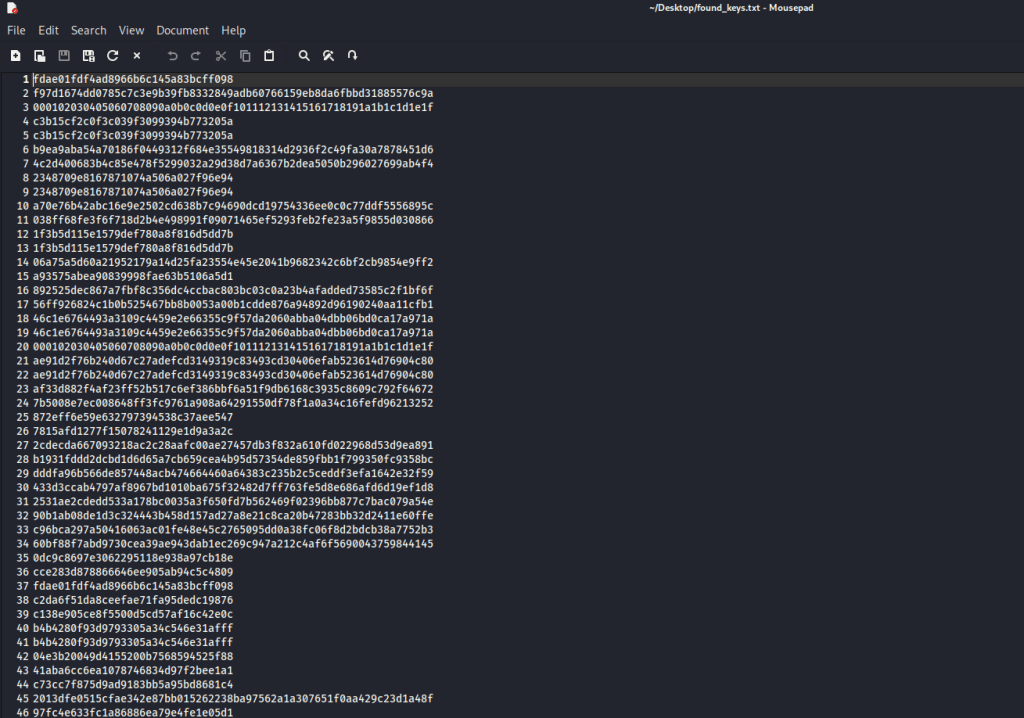
After you have a list of keys, you can put together a script to try each of these keys until you find which one is the decryption key.
Data Remnants
Even if you aren’t able to extract decryption keys from the RAM, you might still be able to extract unencrypted data from it. If the memory dump was taken while the encrypted data was in use, then it is highly likely that you will be able to find it in RAM. Whenever an application is in use, that data is moved into RAM. To demonstrate this, I encrypted a Microsoft Word document, and then opened that file and did a memory dump of my computer while the file was opened.

After dumping the RAM memory, I analyzed it using a memory analysis program called Volatility. One useful command that Volatility offers is:
py vol.py -f <memdump-file> windows.pslist.PsList
This will provide a list of all the processes that were running on the machine at the time the memory dump was taken. Because I was looking for the data in a Microsoft Word document, I needed to look for a process related to Word.
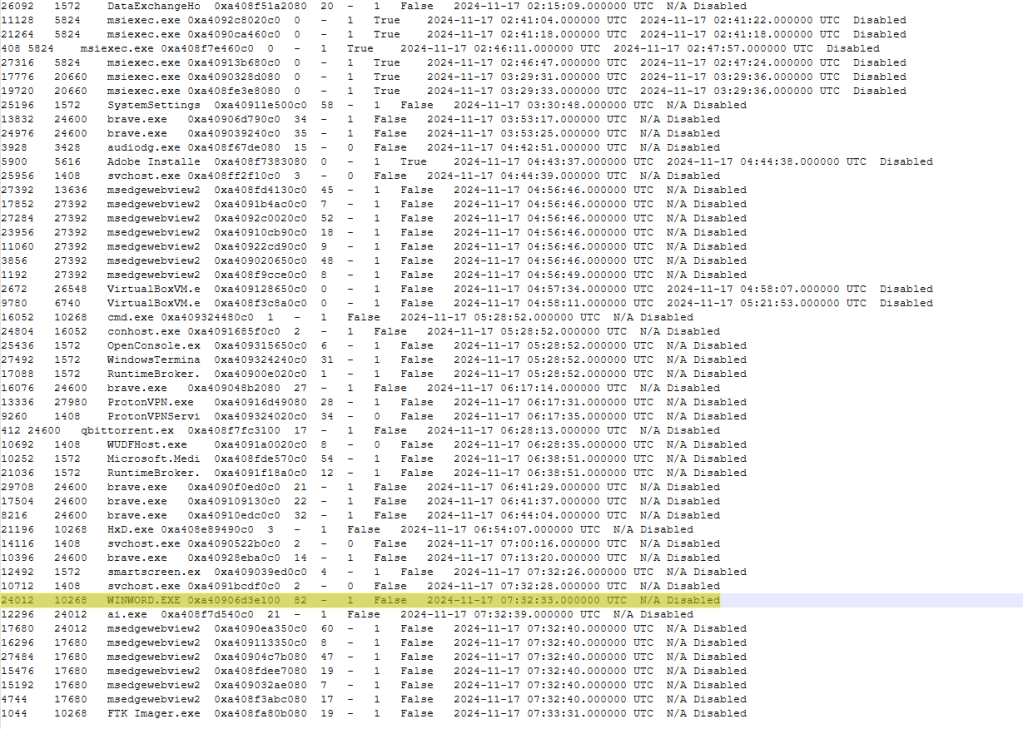
After identifying the process, you can dump the memory related to that process with the command:
py vol.py -f <memdump-file> windows.memmap –pid <process-pid> –dump
I analyzed the resulting data in a hex editor, and as you can see here, the full content from that Word document is viewable here.

With how easy it is to get access to strong encryption, you are bound to run into it eventually. Using the methods detailed here, you will be equipped to not let it stop you from pursuing an investigation.

 Wise Forensics
Leave a comment