
Timestomping
When conducting a forensic investigation, it is crucial to understand the timeline of events that occurred on a system. An investigator can utilize timestamps to gather information about file creation dates, modification dates, access dates, and more. However, if someone wants to complicate an investigation, they could obscure the metadata of certain files to make it more difficult to figure out which time specific events occurred. This practice, known as timestomping, is a common method used to hinder forensic analysis. If you come across a system where timestomping was used during an investigation, there is still a lot you can do to recover that valuable metadata.
To demonstrate this, I have downloaded three files and used a program called Bulk File Changer to change the creation date and modification date to January 1, 1970 at 12:00 AM EST.
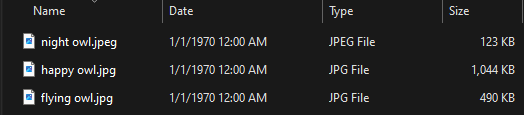
Bulk File Changer does a good job at obscuring the original timestamps. Even if you view the MFT, you will not be able to fully view the original timestamps. I used Eric Zimmerman’s tool, MFTECmd, to parse the MFT file of my computer, and then I extracted some of the data from the MFT entries that house these three files.

As you can see, the creation date and last modified date have also been modified to reflect the false timestamp I created. The only timestamp that wasn’t altered was the third timestamp in this picture that has the label, “LastModified0x30”. That is because this value corresponds to the $FILE_NAME attribute, which tracks changes related to the file’s directory entry, but not necessarily the data. This value is updated when a file is renamed, moved, or has its entry removed and recreated. The timestamp in this entry was likely updated when I used Bulk File Changer to modify the metadata. This data is better than nothing; however, there is a simple way to completely recover the original timestamp.
NTFS Journaling Analysis
NTFS systems use journaling to keep track of changes made to the file system, and this data often persists long after file modification or deletion. By looking into this journaling data, you can recover a lot of valuable data. I’ve covered this in a previous article about secure deletion, but as a quick recap, these are the files that store this journaling data:
$MFT
Location: root\$MFT
Purpose: Database that contains an entry for every file and directory on an NTFS system, including metadata for each entry.
$LogFile
Location: root\$LogFile
Purpose: Transaction log that records changes to the NTFS file system.
$J
Location: root\$Extend\$UsnJrnl\$J
Purpose: Journal that tracks changes to files and directories to keep a record of file system activity.
I extracted these files using FTK Imager, and then used a tool called NTFS Log Tracker to parse it. NTFS Log Tracker only requires you to supply the $LogFile, $J file, and $MFT file (for cross-referencing). Then it will analyze the files and output a SQLite database file with all of the parsed data. After using this tool and analyzing the database file, I was able to find the original timestamps corresponding to the files that I modified the timestamps of.
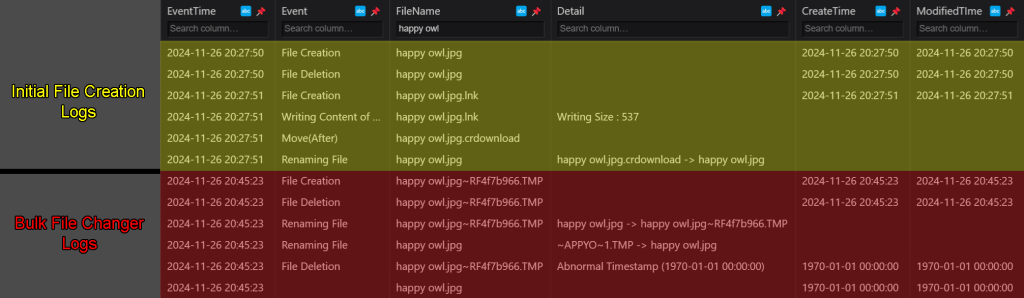
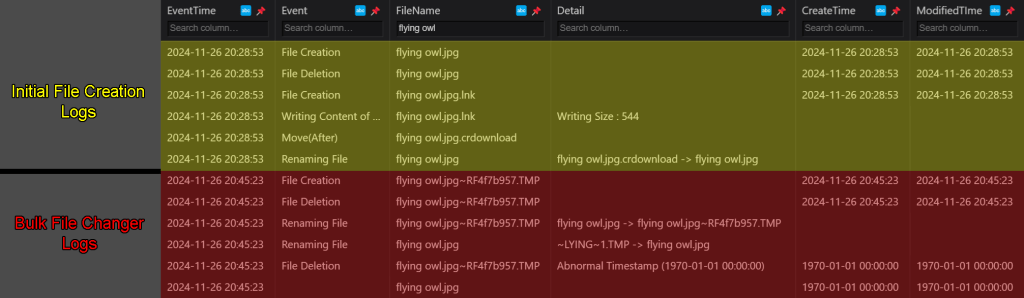
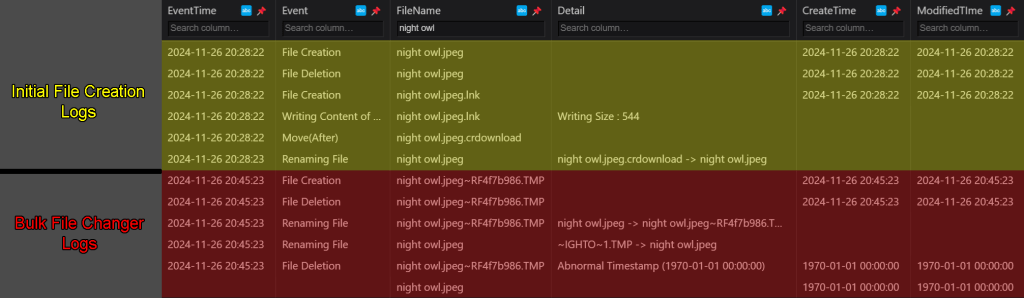
These logs show all system activity related to this file from the moment it was created. The first six entries of the logs in the screenshots are related to when the file was initially downloaded. The file creation dates and modification dates have been completely preserved here. The final six entries of the logs in the screenshots are related to what happened to the files when I modified them using Bulk File Changer. You can see the moment that the timestamp changes to the false timestamp, as it is accompanied with a detail reading, “Abnormal Timestamp”. And even though the creation and modification timestamps change from this point, the EventTime timestamp remains unchanged, so you can still see the exact time that the timestomping occurred.
Although timestomping is a common anti-forensics method, if you know how to approach it then it becomes nothing more than a minor inconvenience.


 Wise Forensics
Leave a reply to Digital Forensics Round-Up, December 05 2024 – Forensic Focus Cancel reply